00 · The operating layer

Light from the machine. Three programs, one platform.

Connect your plant floor, run the day’s routines, and turn ten years of operational data into decisions your teams can act on this shift.

Section 01 · The family

One platform. Three programs. Three different problems.

01 / 09

Integrate brings the plant in. Lumen runs the day. Resolve explains the fault when a line stops. Run one on its own — or all three as one closed loop: signal → decision → fix, on a single login.

01 · EdgeLMN-INT
Lumen Integrate.

Every machine, every controller, every protocol — connected into one live map.

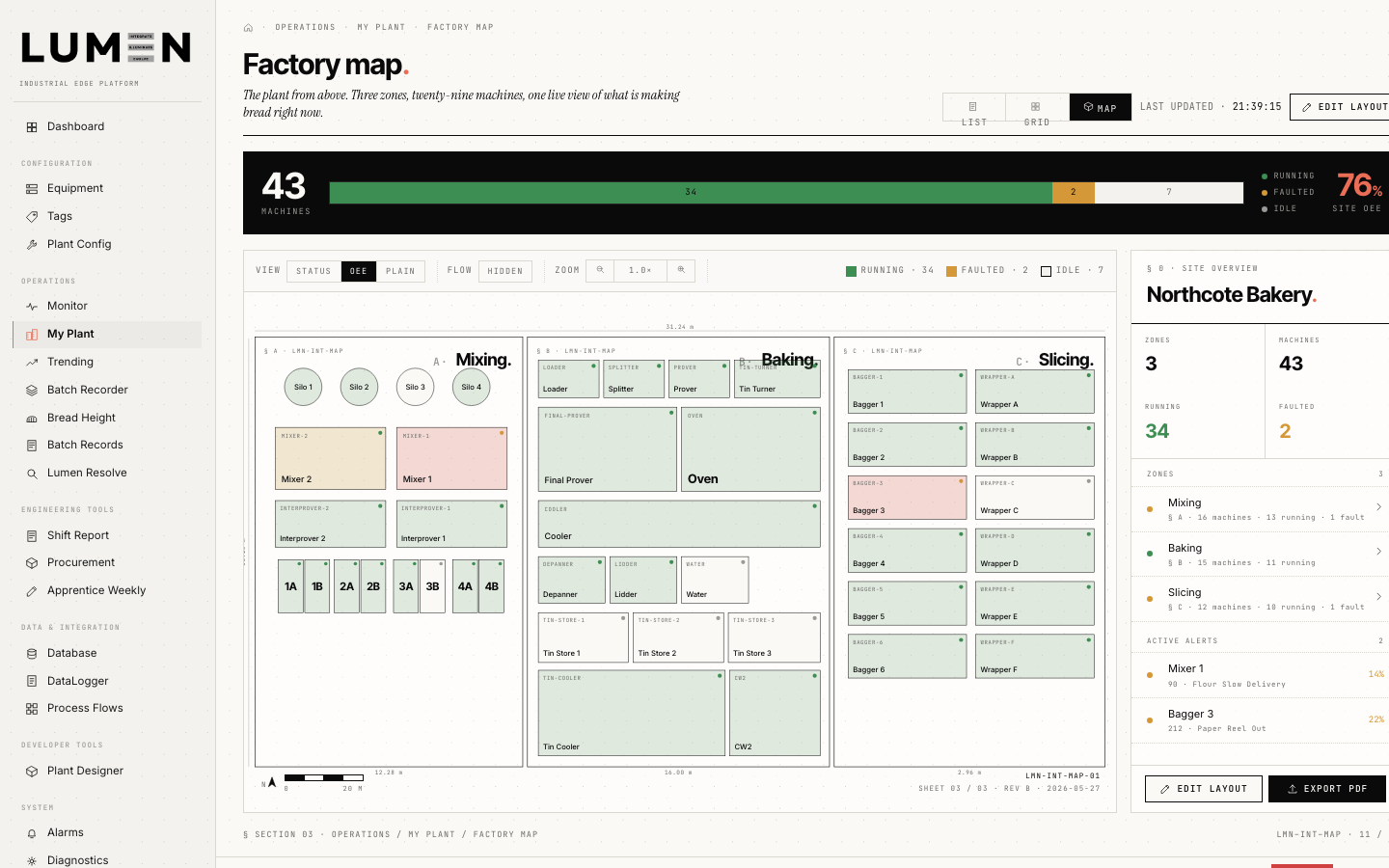
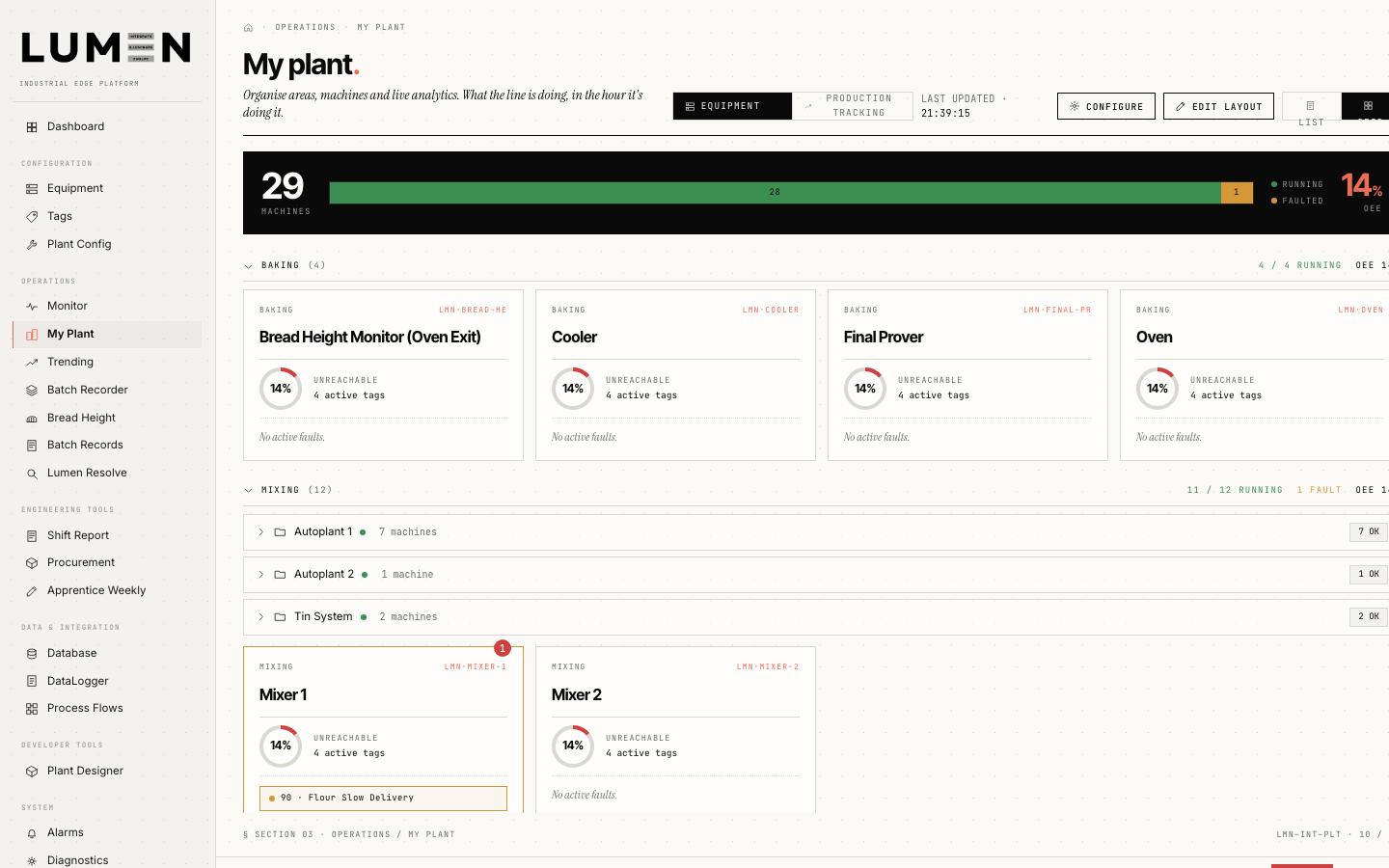
Lumen Integrate My Plant — equipment cards showing running and faulted machines across baking and mixing
  • 01Connect · OPC UA, Modbus, MQTT, libplctag
  • 02Map the floor · no re-keying
  • 03Buffer locally · offline-first
02 · PlatformLMN-IOI
Lumen.

Run the whole operation from one place — and act on it this shift, not at next period's review.

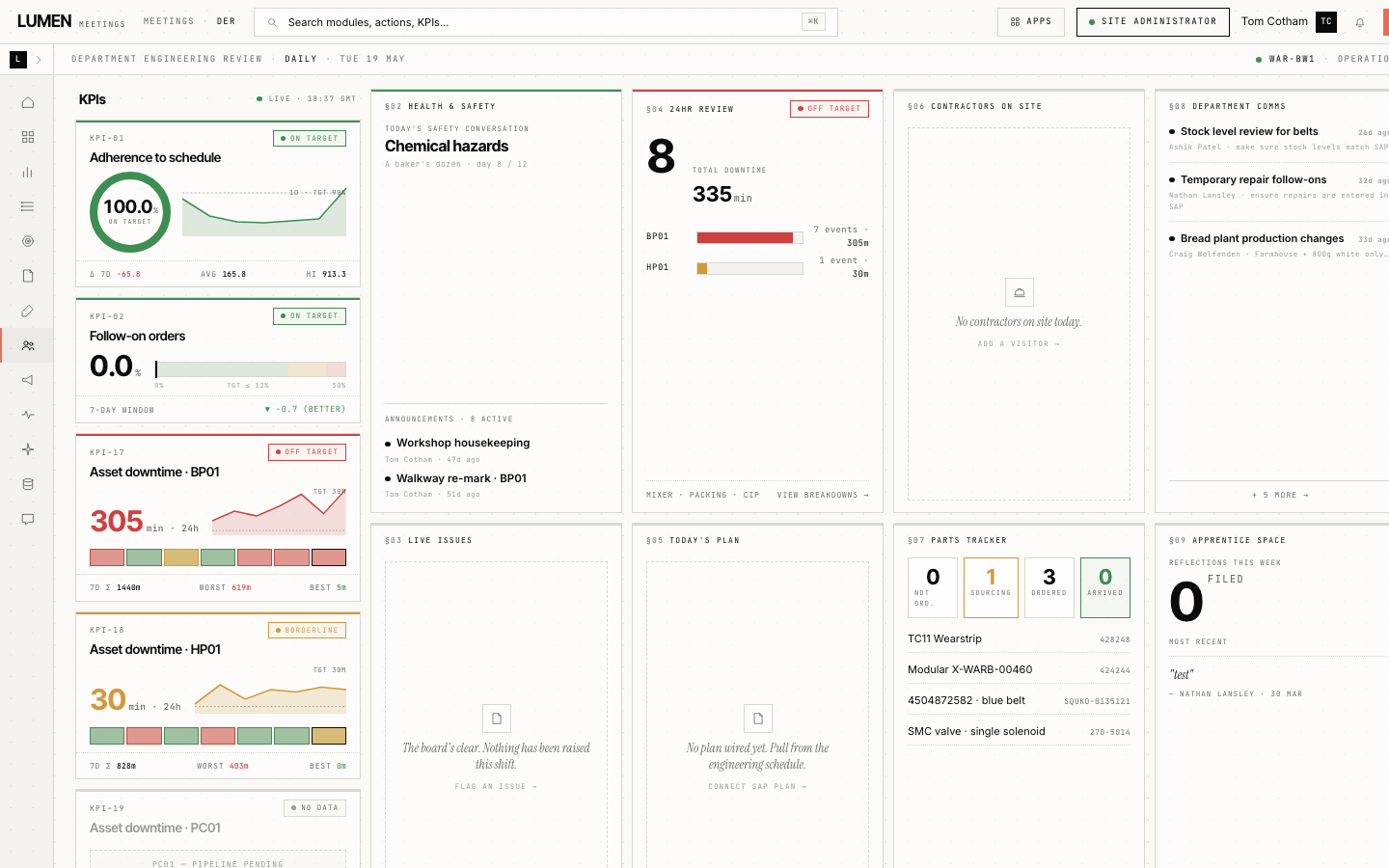
Lumen Daily Engineering Review dashboard — KPIs, asset downtime, follow-on orders, chemical hazards, contractors on site
  • 01Twelve modules · one interface
  • 02Ask L. · evidence-first data agent
  • 03Sits above · your ERP, CMMS & historians
03 · AgentLMN-RES
Lumen Resolve.

Ask a stopped line what's wrong — plain-English answers, with evidence, in seconds.

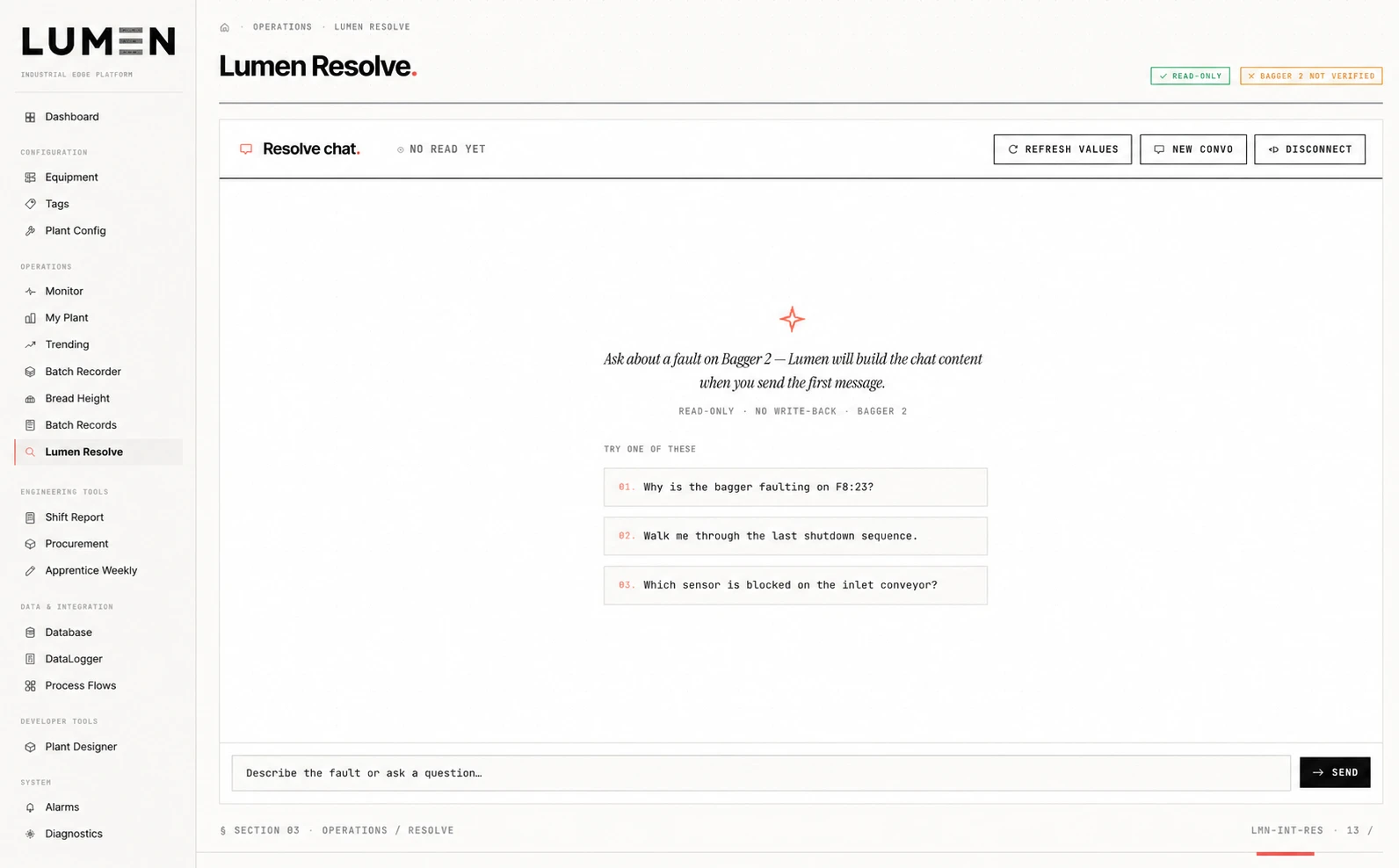
Lumen Resolve chat — read-only mode, with example fault questions for Bagger 2
  • 01Hot-connects · no integration project
  • 02Plain-English answers · with evidence
  • 03Read-only · never writes back
Section 02 · The case

Your plant runs on data it already has. Lumen makes that data usable.

02 / 09

The shift starts. One person walks the floor with a clipboard, another digs through email for the schedule, a third opens four tabs to build the morning report. Decisions get made on whatever was visible at the time.

Your plant already has the data — an ERP for work orders, a historian for tags, sensors, OEE dashboards, and a spreadsheet for the gaps. What's missing is one place to see and act on all of it, together.


What we hear from operations leaders
  • 01.“KPIs lag by a day. By the time we see the trend, the shift is gone.”
  • 02.“RCAs sit on engineers' desks for six weeks. We can't see the backlog.”
  • 03.“The DOR meeting runs off a printout. Half the actions never reach a system.”
The asymmetry

The data exists. The decisions are slow.

A modern plant emits more telemetry in a shift than a planner can read in a week. The bottleneck isn't measurement — it's the lag between a sensor catching a deviation and a team leader being told, in plain language, what to do.

Section 03 · Integrate

Every machine. Every protocol. One industrial data platform.

03 / 09
Integrate · Factory map
Lumen Integrate Factory Map — Mixing, Baking and Slicing zones with OEE health roll-up, 43 machines, 76% OEE
Section 04 · Illuminate

What the line is doing, in the hour it's doing it.

04 / 09
Lumen · Live view
Lumen Daily Engineering Review — KPIs, adherence-to-schedule 100%, asset downtime sparklines, chemical hazards, contractors on site, parts tracker
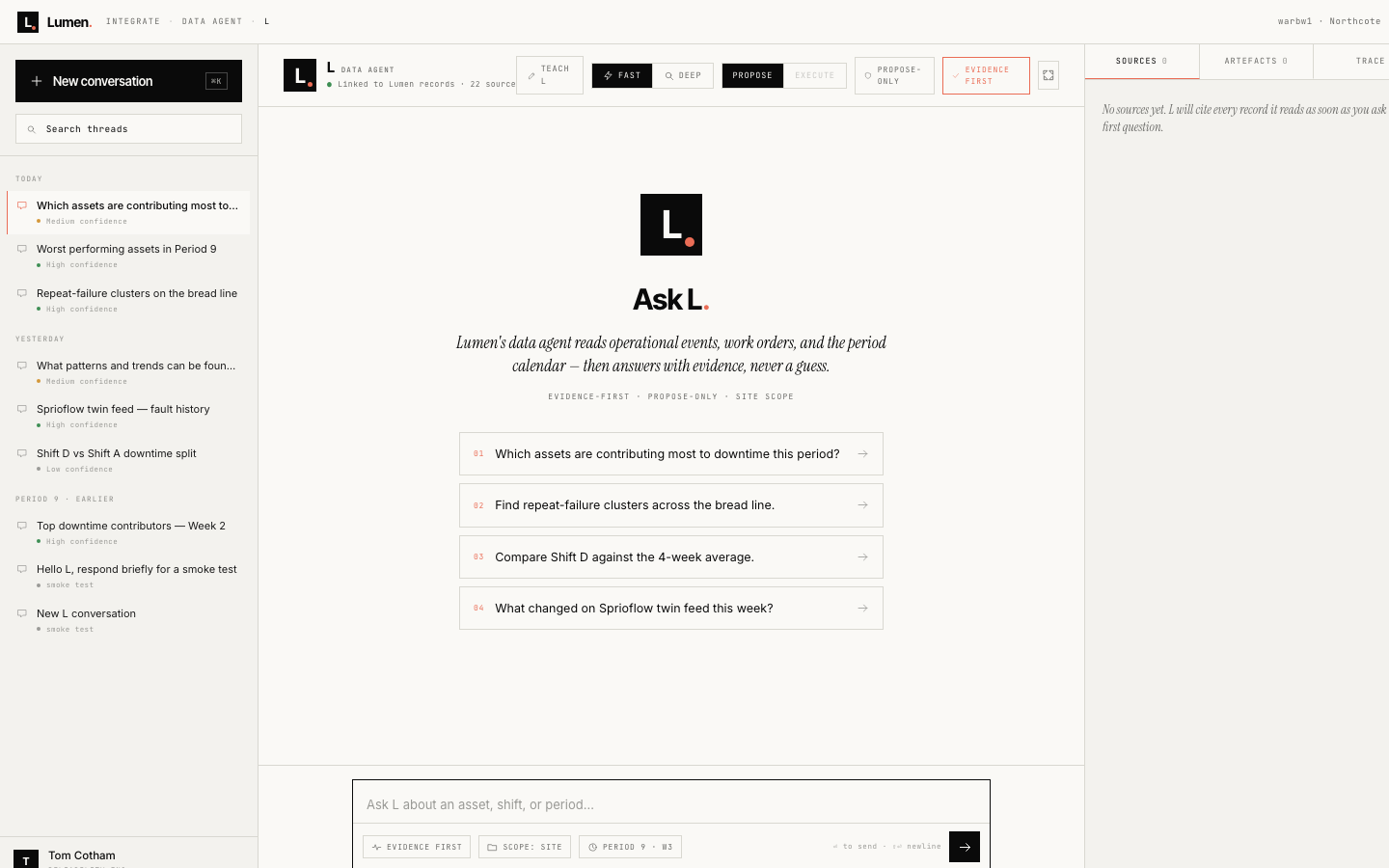
Ask L. — Lumen's evidence-first data agent with conversation history and sources panel
Inside Lumen · The data agent

Ask L.

Lumen's data agent reads operational events, work orders, and the period calendar — then answers with evidence, never a guess.

Evidence-first Propose-only Site-scoped Sources panel on every answer
Section 05 · Resolve

When a line goes down, talk to Resolve.

05 / 09
Resolve · Read-only
Lumen Resolve chat — read-only mode, with example fault questions for Bagger 2
Resolve · In practice
Section 06 · Roles served

The same numbers, four different roles.

06 / 09
OP. · Operator

Hour-by-hour line of sight.

This shift's targets, last shift's handover, live machine health, and the actions on them right now.

  • Shift handover
  • SIC tiles
  • Action queue
TL. · Team leader

The shift, on a single page.

SIC dashboard, daily action board, and a digital DOR — agenda, attendance and follow-ups all tracked.

  • SIC dashboard
  • Daily action board
  • Digital DOR
EN. · Engineer · planner

From schedule to root cause.

AI planning across a multi-week schedule, plus FMECA, CBM and RCPS — with a round-trip to ERP, no re-keying.

  • Smart planner
  • FMECA · CBM · RCPS
  • ERP round-trip
SLT. · Site leadership

Period without the postmortem.

Site scorecard, KPI cascades, project hopper and MEX maturity — the whole site at a glance.

  • Period scorecard
  • MEX maturity
  • Project hopper
Section 07 · Lumen module catalogue

Choose your modules. One operating rhythm.

07 / 09

Run the set your operation needs — a handful or the full catalogue, added to as you grow. Each is a first-class surface, not a tab on a dashboard. Twelve available today:

01 · Actions
Action management
Every action on one board — kanban, owners, escalation.
02 · KPI
KPI system
Live KPIs from site to machine, with history and targets.
03 · SIC
Short Interval Control
Hourly output and downtime Pareto, built for floor displays.
04 · Reliability
RCPS
AI-assisted 5-Why and Fishbone, with CAPA tracking.
05 · Reliability
FMECA
Failure modes and criticality, linked to your assets.
06 · Reliability
CBM
Condition monitoring with live sensor trends and alerts.
07 · Planning
Maintenance planner
AI planning across a multi-week schedule and backlog.
08 · Planning
Labour planner
Headcount, allocations and craft scheduling.
09 · Meetings
Meeting cascade
DOR to weekly — agendas, attendance, actions, summaries.
10 · Insights
Adaptive insights
Predictive flagging and the Ask L. data agent.
11 · Procurement
Procurement
POs, parts catalogue and stores visibility.
12 · Collab
Collaboration
Real-time messaging, boards and workflows.
Section 08 · Architecture

Cloud-native. ERP-compatible. Edge-aware.

08 / 09

Lumen sits above your systems of record — it doesn't replace them — and gives every tier the same live view of the site.

01 · Edge On-prem at the line. Offline-first, 500ms tick.
Program ▶Lumen Integrate
ProtocolsOPC UA · Modbus · MQTT
BufferLocal store-and-forward
02 · Platform Single-tenant per site, in your region.
ComputePrivate cloud
DatabaseManaged Postgres
RealtimeRedis pub/sub
03 · Intelligence Server-only. Grounded in your data, never trained on it.
EnginesTwo server-side LLMs
SurfacesAsk L. · RCPS · Resolve
BoundaryRead-only on Resolve
04 · Integration Two-way with your systems of record. 136+ endpoints.
ERPWork orders · GR
CMMSAssets · PM
HistorianTags · events
Section 09 · The payoff

See it. Decide it. Fix it.

09 / 09

Integrate, Lumen and Resolve close one loop — the moment a line deviates, the people who run it see it, decide, and act. This shift, not next period's review.

500ms

See it as it happens

Every controller live on one page — the whole floor at a 500ms edge tick.

1login

Decide from one place

Twelve modules under one login — KPIs, SIC and the daily review at the line, no re-keying.

Seconds

Fix it without a callout

With Ask L. and Resolve, anyone on shift gets a clear, evidence-backed answer — no waiting on the one engineer who knows the line.

Every number your plant already makes — finally working for the people who run it.

3 programs 12+ modules 136+ live APIs Single-tenant per site SOC 2 Type II ISO 27001
FAQ · Plant operations software

Questions, answered plainly.

Claim-safe · On-page only
What is Lumen?

Lumen is plant operations software from Omnitech: three programs for industrial sites. Integrate connects plant systems at the edge; Lumen runs daily operations modules; Resolve helps answer faults with evidence and is read-only by design.

What is Lumen Integrate?

Lumen Integrate is the edge program that connects plant controllers and protocols—including OPC UA, Modbus, MQTT, and libplctag—into one live map. It runs on-prem, offline-first, with local store-and-forward.

What is Lumen Resolve?

Lumen Resolve is a fault-narration program for stopped or faulted equipment. Operators and engineers can ask plain-English questions and get answers with evidence. Resolve is read-only and does not write back to the PLC.

What modules does the Lumen platform include?

Twelve modules under one login, including action management, KPI system, Short Interval Control (SIC), RCPS, FMECA, CBM, maintenance and labour planning, meeting cascade, adaptive insights with Ask L., procurement, and collaboration.

What happens after I request a Lumen walkthrough?

We reply within one business day with two meeting windows. Then a thirty-minute call with a solutions engineer on the live product, a written scoping note for one line, one shift, and one KPI—and if it fits we calendar a pilot; if it does not, we say why.

See Lumen · 30-minute walkthrough

See Lumen on your line.

Reply in 1 business day

A thirty-minute walkthrough of the live product — Integrate, Lumen, or Resolve — and a written one-pager scoping a pilot on one of your lines.

We answer every request. No marketing list. Read once, replied to once.

OfficeOmnitech UK · Manchester
HoursMon–Fri · 08:00–18:00 GMT
What happens next
  • 01.We email within one business day with two windows that suit your timezone.
  • 02.Thirty minutes on a call with a Lumen solutions engineer — no slide deck, only the live products.
  • 03.A written scoping note covering one line, one shift, one KPI to move first.
  • 04.If it fits, we put a pilot on the calendar. If it doesn't, we tell you why.